

RDP vs VPS is one of the most confusing topics for beginners, freelancers, traders, and business owners.
Many people believe that RDP and VPS are the same thing because both provide remote access to a Windows environment. However, they differ significantly in control, resource allocation, software installation, and flexibility.
Choosing the wrong option can limit what you can do, especially if you need administrator access, custom software, hosting capabilities, or dedicated resources.
In this guide, we’ll explain the 7 critical differences between RDP and VPS in simple language.
RDP vs VPS: Quick Comparison
RDP and VPS are not the same thing.
- RDP (Remote Desktop Protocol) is a technology used to remotely access a computer.
- VPS (Virtual Private Server) is a virtual machine with dedicated resources.
Think of it this way:
- VPS = The computer
- RDP = The method used to access that computer
Many providers sell shared Windows environments as RDP services, while a VPS provides a dedicated virtual environment with greater control and flexibility.
Difference #1: What They Actually Are
What Is RDP?
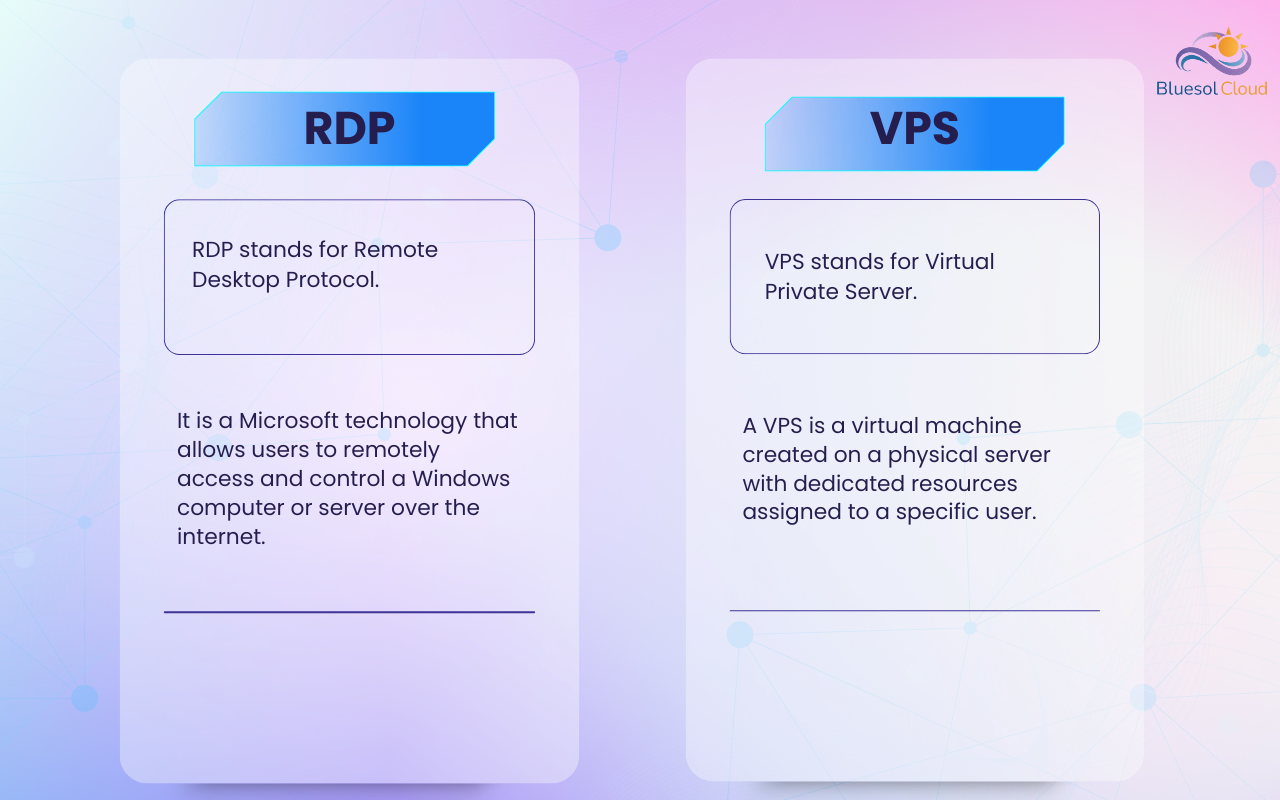
RDP stands for Remote Desktop Protocol.
It is a Microsoft technology that allows users to remotely access and control a Windows computer or server over the internet.
Most shared RDP services provide access to a Windows environment that may be shared with multiple users.
What Is VPS?
VPS stands for Virtual Private Server.
A VPS is a virtual machine created on a physical server with dedicated resources assigned to a specific user.
The VPS operates independently and gives users greater control over their environment.
Key Difference
- RDP = Remote access technology
- VPS = Virtual server environment
Difference #2: Shared vs Dedicated Resources
One of the biggest differences is how resources are allocated.
Shared RDP
In many RDP services:
- Multiple users share the same server
- CPU resources are shared
- RAM resources are shared
- Storage resources may be shared
Performance can vary depending on how other users utilize the server.
VPS
A VPS typically provides:
- Dedicated RAM allocation
- Dedicated CPU allocation
- Dedicated storage allocation
Your resources are isolated from other users.
Key Difference
RDP environments are often shared, while VPS resources are usually dedicated to a single user.
Difference #3: Administrator Access and Control
This is often the deciding factor for many users.
Shared RDP
Most shared RDP services provide limited access.
Users may not be able to:
- Create new Windows users
- Modify core system settings
- Change server configurations
- Install certain software
- Access administrative tools
VPS
Most Windows VPS plans provide full Administrator access.
Linux VPS plans typically provide Root access.
Users can:
- Create users
- Install software
- Configure firewalls
- Manage security settings
- Modify system configurations
- Control the server environment
Key Difference
VPS provides significantly more control and flexibility than shared RDP services. When comparing RDP vs VPS, administrator access is often the most important factor.
Difference #4: Software Installation
The ability to install software is a major consideration.
Shared RDP
Suitable for:
- Freelancing
- Data entry
- Office applications
- Web browsing
- Light software usage
Software installation may be restricted by the provider.
VPS
Users can typically install:
- MT4
- MT5
- Python
- Docker
- OBS Studio
- Databases
- Web servers
- Custom applications
Key Difference
VPS environments provide much greater freedom for software installation and customization.
Difference #5: Performance and Reliability
Performance requirements vary depending on the workload.
Shared RDP
Performance may fluctuate because multiple users share resources.
Heavy activity from one user can affect others.
VPS
Resources are allocated specifically to your virtual machine.
This generally provides:
- More predictable performance
- Better stability
- Greater reliability
Key Difference
VPS environments usually provide more consistent performance.
Difference #6: Best Use Cases
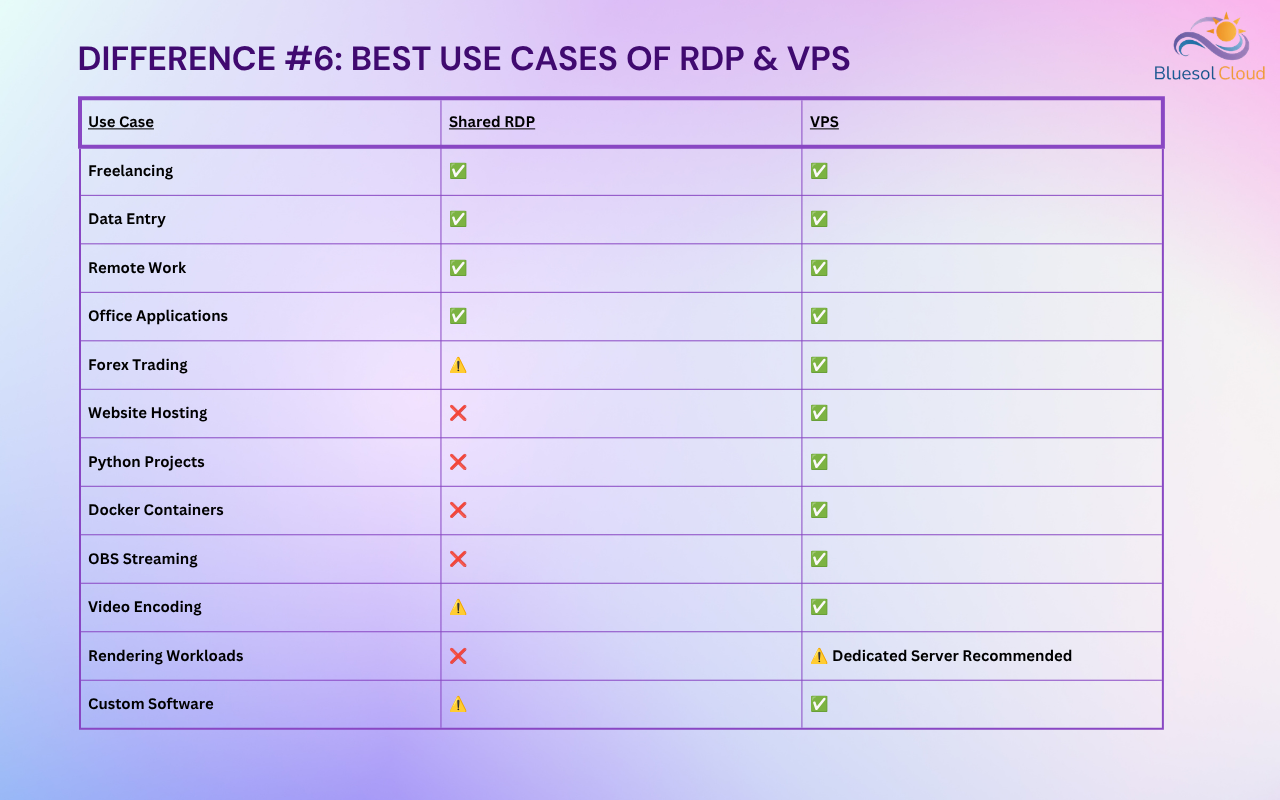
| Use Case | Shared RDP | VPS |
|---|---|---|
| Freelancing | ✅ | ✅ |
| Data Entry | ✅ | ✅ |
| Remote Work | ✅ | ✅ |
| Office Applications | ✅ | ✅ |
| Forex Trading | ⚠️ | ✅ |
| Website Hosting | ❌ | ✅ |
| Python Projects | ❌ | ✅ |
| Docker Containers | ❌ | ✅ |
| OBS Streaming | ❌ | ✅ |
| Video Encoding | ⚠️ | ✅ |
| Rendering Workloads | ❌ | ⚠️ / Dedicated Server Recommended |
| Custom Software | ⚠️ | ✅ |
Key Difference
RDP is generally suitable for basic remote computing tasks, while VPS is designed for hosting applications, websites, trading platforms, and custom workloads.
Difference #7: Scalability and Future Growth
As your requirements grow, scalability becomes important.
Shared RDP
Upgrade options are often limited.
Users may be restricted by:
- Shared infrastructure
- Provider policies
- Limited customization
VPS
Users can often:
- Upgrade RAM
- Upgrade CPU resources
- Add storage
- Deploy additional applications
- Scale according to business requirements
Key Difference
VPS solutions provide significantly greater scalability and long-term flexibility.
Real-World Example:
Imagine you rent office space.
Shared RDP
A shared RDP is like renting a desk in a coworking office.
You can work there, but:
- You don’t control the building
- You can’t redesign the workspace
- Your activities may be limited by management rules
VPS
A VPS is like renting your own private office.
You can:
- Install what you need
- Create users
- Customize the environment
- Control how the workspace operates
This is why businesses, developers, traders, and website owners often choose VPS solutions.
RDP vs VPS: Which One Should You Choose?
Choose Shared RDP If:
- You need remote desktop access
- You perform freelancing tasks
- You use office applications
- You have basic computing requirements
- You want a lower-cost solution
Choose VPS If:
- You need full Administrator access
- You want to install custom software
- You run MT4 or MT5
- You host websites or applications
- You need dedicated resources
- You require greater flexibility and control
Frequently Asked Questions:
1. Is RDP the same as VPS?
No. RDP is a remote access protocol, while VPS is a virtual server.
2. Can I use RDP on a VPS?
Yes. Most Windows VPS servers are accessed through Remote Desktop Protocol (RDP).
3. Do VPS plans provide administrator access?
Most Windows VPS plans provide Administrator access, while Linux VPS plans provide Root access.
4. Can I install my own software on a VPS?
Yes. Most VPS solutions allow users to install supported software and customize the environment.
5. Which is better for Forex trading?
A Windows VPS is generally preferred because it provides dedicated resources and greater control.
6. Can I host a website on a shared RDP?
Shared RDP services are generally not intended for website hosting. A VPS is usually the better choice.
Conclusion
Understanding the RDP vs VPS comparison helps users choose the right solution for their workload and budget.
Shared RDP services are often suitable for remote work, freelancing, office applications, and basic computing tasks.
However, if you need administrator access, software installation capabilities, website hosting, MT4/MT5 trading platforms, dedicated resources, or long-term scalability, a VPS is usually the better choice.
The right option depends on your workload, budget, and the level of control you require.